|
Register for Your Advertising Account
|
|
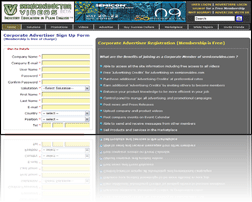
Corporate Registration Page.
|
Sign up for an Advertiser's Account Now!. (We require only basic information that will not be shared with any other party.)
Registration is free of charge.
Only registered members can advertise their products and services on semiconvideo.com. However advertising is not the criteria for registration.
An Advertiser's Account allowes you to access many site resources as well as to maintain visibility among site users. For example you can present your Company Profile and show your key personnel to the public as well as to contact other members in your communities within semiconvideo.com
|
|
| |
 |
Verify Your Registration
|
|
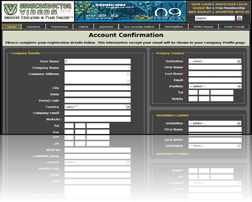
Landing Page to complete
your company information after
you has confirmed your registration.
|
You will immediately receive an email with a link to this website for registration confirmation. Please contact us if you do not receive this verification email. You may also check your spam folder in case the email is directed to your 'junk' box.
Please also ensure that you have input your correct email address during the time of registration in order to expedite the opening of your Advertiser's Account.
At any time if you encounter any problem regarding your registration, please do not hesitate to contact our customer service staff for any assistant.
|
|
| |
 |
Access Your Account
|
|
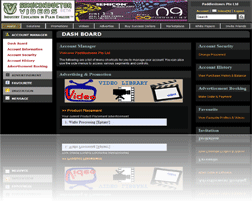
Your Control Panel and Dashboard.
|
After confirming your registration, you will be permitted to access various member's section of the website. Please browse through the various pages, features, functions and video segments on semiconvideo.com.
We have many interesting areas pertaining to the information and education of the semiconductor industry, as well as many opportunities for you to promote your product and services.
We shall constantly add new features and information to semiconvideo.com to benefit all users and to allow advertisers the opportunities to reach out to their potential customers effectively.
|
|
| |
 |
Select Your Product Category
|
|
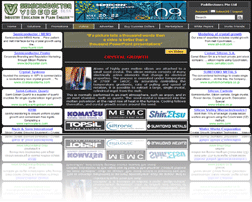
A typical Video category Page.
|
You may advertise in one or multiple video categories related to the products and services you want to promote.
To maximize your advertising effectiveness, you should advertise and promote in the category directly related or closest to the kind of products and services you are offering. Please do not hesitate to contact us if you do not find a category that is suitable to your product & services
You can book your 'Text Box' and 'Basic' advertisement spaces directly online through semiconvideo.com. However if you are interested in either 'Product' Placement within each video or any 'Banner' advertisements, you must contact us directly to find out if there is available space.
|
|
| |
 |
Check for Space Availability
|
|
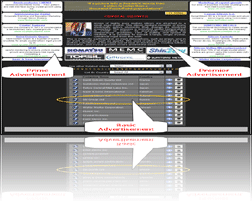
Type of Advertisement Space available.
|
Check space availability for your choice of advertisement on the selected video/videos and the amount of Success Dollars required for your advertising.
Please note that each category will contain only 6 'Prime' Advertisements while 'Text Box' advertisements are limited to 24 advertisers at any time. There is no limit for 'Basic' advertisements.
You can check for space availability by checking on the 'Vacancy' icon on each product pages. A green 'Vacancy' sign indicates that there is still advertising space available while a red sign means that there is no more available advertising space at the moment.
|
|
| |
 |
Book Your Advertising Space
|
|
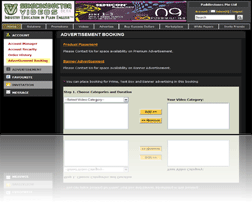
Your Member's Advertisement
Booking Cart.
|
Once you have decided on your choice of advertisement and in which category/categories to use to advertise your products and services, you can place your booking and add your 'Advertisement Space Purchase' to your shopping cart.
Please note you can add one or multiple advertising opportunities to the same cart. You can also have a mixture of different kind of advertising types in the same cart.
At any time if you have difficulty in performing your bookings, please do not hesitate to contact us for any assistance. Our customer service staff will be glad to assist you and guide you through the whole process.
|
|
| |
 |
Select Your Advertising Duration
|
|
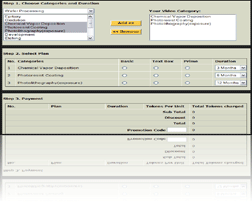
Select your advertising duration
with the drop down menu
|
While shopping for your advertisement spaces, select from our choice of advertising durations. We have plans that suit all advertisers' budgets.
You can choose monthly, quarterly, half-yearly or yearly plans. The longer the duration, the lower the cost per month. Please note that once a plan is selected, it cannot be changed later.
At any time if you need clarifications about the various advertising plans, please do not hesitate to contact our customer service staff for any assistance.
|
|
| |
 |
Purchase Success Dollars
|
|
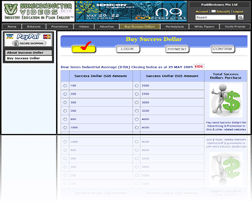
This page allows you to buy
Success Dollars.
|
Proceed to purchase your Success Dollars. Success Dollars are the virtual currency used to pay for advertisement space on semiconvideo.com. (For more information, please visit the "Buy Success Dollars" link on this site.)
Success Dollar can be purchased with major credit cards, PayPal, checks/cashier orders or by bank wire transfers. Success Dollars are sold in various denominated bundles.
Please note that Success Dollars purchased by checks or cashier orders may take up to two weeks and wire transfers may require up to seven working days to clear.
For expedited advertising services, we recommend using either a major credit card or PayPal payment.
|
|
| |
 |
Buy Sufficient Success Dollars
|
|
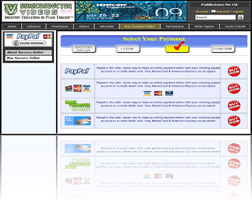
Payment Page for Success Dollars.
|
Make sure to buy enough Success Dollars to cover the total cost of your advertising. Additional Success Dollars can be purchased and stored in your account for future payments. You may also choose to transfer or sell excess Success Dollars to other advertisers later.
The value of Success Dollars is tied directly to the price movement of the Dow Jones Industrial Average (DJIA). To maintain a constant budget, you can purchase additional Success Dollars during a DJIA uptrend and store them in your account for future advertising needs.
As an additional incentive, semiconvideo.com will allocate bonus Success Dollars as a reward for the purchase of larger amount of Success Dollars.
|
|
| |
 |
Pay for Your Advertising
|
|
Advertisement Booking Cart.
|
Pay for your prior advertisement booking in your shopping cart using the Success Dollars in your account. You may do so if you have sufficient amount of Success Dollars in your account at that poin in time. If not, you may purchase additional Success Dollars to cover your payment.
While waiting for your payment for your Success Dollars to clear, your advertising choices will be reserved for up to two weeks after which time the advertising spaces reserved will be opened to other advertisers.
Once payment has cleared, you will receive an email notification to login and proceed to your 'saved' shopping cart. From there you can submit, confirm and pay for your advertisement campaign.
|
|
| |
 |
Your Advertisement Confirmation
|
|
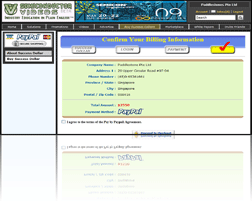
Confirmation Email to verify
your advertising placement.
|
For security reason, we will send you a verification email with a unique confirmation code for your campaign acknowledgement. Please login to your account and input in the confirmation code to start managing your advertisement and promotional campaigns.
Please contact us if you do not receive this verification email. You may also check your spam folder in case the email is directed to your 'junk' box.
At any time if you encounter any problem regarding your advertising confirmation, please do not hesitate to contact our customer service staff for any assistance.
|
|
| |
 |
Account & Advertising Management
|
|
Members' Control Panel to
Manage Campaign.
|
During your campaign duration, you can modify advertising details any time if you are not satisfied with the response.
Changes include texts and headlines displayed in your advertisements; company information; advertisements in your product showroom; video uploads; product news and company press releases; company blog; networking affiliations; key personnel listings; and other functions and benefits associated with your account.
From this point onwards, you can always login to your account to monitor your campaign ROI. You can check the number of views to your various promotions and advertisements. You can also check for messages and queries left for you.
|
|
 Print a text copy